
# 热门搜索 #
大模型
人工智能
openai
融资
chatGPT
最近,有很多朋友来请教我们一个问题,GEO到底要怎么做,才能让生成的内容质量更高。
这个问题可以拆成两部分。
第一,怎么优化提示词,能让AI产出更精美,不带明显AI味儿的内容,这一般需要GEO公司内部的 know-how 积累。
第二,怎么辅助客户或者业务部门,建设知识库,让Agent 产出带着企业知识和历史经验的高质量内容。
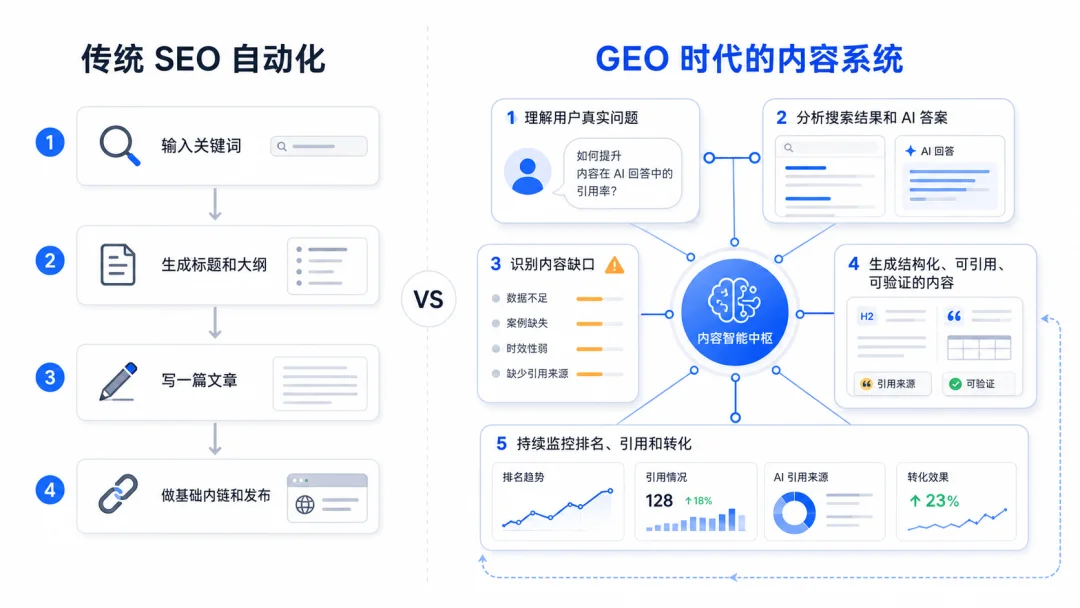
针对后一种情况,我们会建议用 Hermes 风格的 Agent 工程来组织 GEO Pipeline,并围绕 Milvus 建立企业的知识与记忆体系。
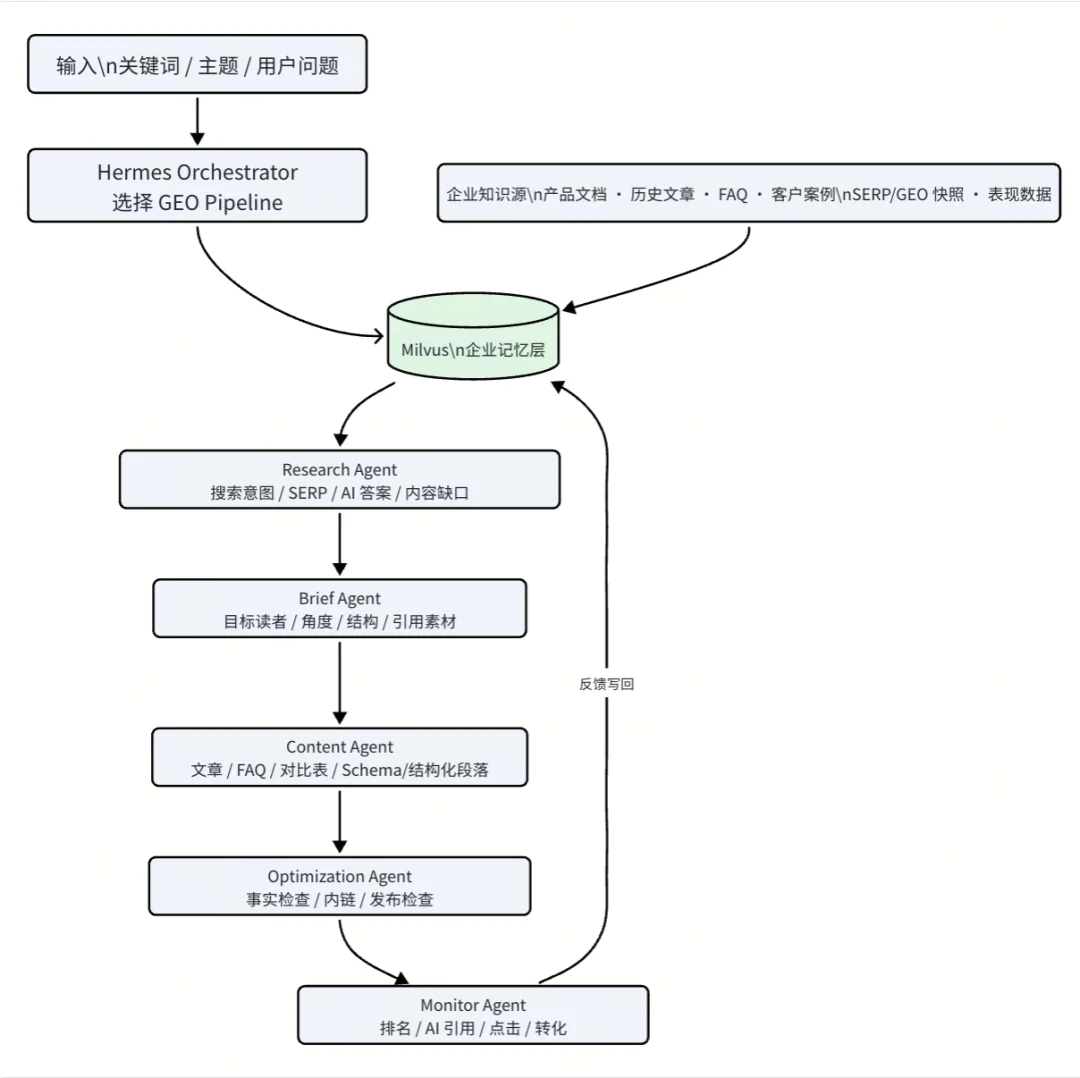
以下张图,是我们建议做GEO Hermes 的标准配置,整体可以分为两大模块。
模块一,决策模块:Orchestrator 判断任务类型,Research、Brief、Content、Optimization、Monitor 几个 Agent 按顺序推进。分别用于研究用户问题、生成内容 brief、生产结构化内容、质量检查、监控内容是否被搜索和 AI 答案引用并由 Orchestrator 编排成能共享上下文、工具和记忆连续工作流。
模块二,记忆模块,由Milvus 在中间做企业记忆层,存放产品文档、历史文章、FAQ、客户案例、可选的 SERP/GEO 快照和表现数据。每个 Agent 需要上下文时,都从同一套记忆里检索;监控阶段拿到的新结果,也会继续写回去。
接下来,我们用 OpenAI embedding、Milvus 和一个最小 Hermes Orchestrator,搭建一条可以运行的 GEO Pipeline。
先安装需要的依赖。这里使用 OpenAI 生成 embedding,使用 Milvus Lite 在本地保存向量数据。
pip install "pymilvus[milvus_lite]" openai
设置 OpenAI API Key,并指定 embedding 模型。这里使用 text-embedding-3-small,向量维度设置为 512。
exportOPENAI_API_KEY="YOUR_OPENAI_API_KEY"
exportOPENAI_EMBED_MODEL="text-embedding-3-small"
exportOPENAI_EMBED_DIM="512"
Hermes 的核心是先把 Agent 的职责拆清楚。这个最小示例里,我们定义四个 Agent:Research、Brief、Content 和 Monitor。
COMPANY_BRAIN = {
"brand": "Milvus",
"audience": "AI engineers and platform teams",
"product": "open-source vector database for AI applications",
"voice": "technical, practical, evidence-based",
}
AGENT_PROFILES = {
"research": {
"goal": "derive search intent, user questions, and GEO gaps from company memory",
"sources": ["product_doc", "blog", "faq", "case_study", "geo_playbook"],
},
"brief": {
"goal": "turn research into an executable content brief",
"sources": ["product_doc", "blog", "faq", "case_study"],
},
"content": {
"goal": "draft structured content for SEO and GEO",
"sources": ["product_doc", "blog", "geo_playbook"],
},
"monitor": {
"goal": "write performance feedback back into memory",
"sources": ["performance_memory"],
},
}
真实的企业记忆可以来自产品文档、历史博客、FAQ、客户案例和内容表现数据;如果生产环境已经接入搜索 API,也可以把 SERP 快照和 AI 搜索答案作为额外记忆写入 Milvus。为了跑通流程,这里先准备几条短文本。
SEED_MEMORY = [
{
"text": "Zilliz Vector Lakebase is a semantic-centric data platform where open storage and elastic compute converge for AI workloads.",
"source": "product_doc",
"topic": "Vector Lakebase",
"content_type": "definition",
},
{
"text": "Vector Lakebase supports three workload modes: real-time retrieval for latency-critical serving, iterative discovery for multi-step exploration, and batch analytics for offline mining and dataset optimization.",
"source": "blog",
"topic": "Vector Lakebase",
"content_type": "explanation",
},
{
"text": "AI systems are no longer just a single-query retrieval problem; they operate as a continuous loop of serving, learning, and improving.",
"source": "faq",
"topic": "AI data foundation",
"content_type": "positioning",
},
{
"text": "A vector database mainly supports real-time retrieval, while Vector Lakebase adds interactive discovery and batch analytics on top of a unified semantic data plane.",
"source": "geo_playbook",
"topic": "Vector Lakebase",
"content_type": "comparison",
},
{
"text": "External Data Lake Search creates a zero-copy logical mapping from Zilliz to existing lake tables while enabling high-performance indexes and full-spectrum search.",
"source": "case_study",
"topic": "External Data Lake Search",
"content_type": "capability",
},
]
使用 OpenAI SDK 封装一个简单的 embedding 函数。后面写入 Milvus 和检索查询时都会调用它。
from __future__ import annotations
import hashlib
import os
from dataclasses import dataclass
from pathlib import Path
from typing import Iterable
from openai import OpenAI
from pymilvus import MilvusClient
ROOT = Path.cwd()
DEFAULT_DB = ROOT / "hermes_geo_memory.db"
COLLECTION = "hermes_geo_memory"
EMBED_MODEL = os.getenv("OPENAI_EMBED_MODEL", "text-embedding-3-small")
DIM = int(os.getenv("OPENAI_EMBED_DIM", "512"))
LLM_MODEL = os.getenv("OPENAI_LLM_MODEL", "gpt-4.1-mini")
defstable_id(text: str) -> int:
returnint(hashlib.md5(text.encode("utf-8")).hexdigest()[:12], 16)
classOpenAIEmbedder:
def__init__(self, model: str = EMBED_MODEL, dimensions: int = DIM):
ifnot os.getenv("OPENAI_API_KEY"):
raise RuntimeError("OPENAI_API_KEY is not set. Export it before running this notebook.")
self.client = OpenAI()
self.model = model
self.dimensions = dimensions
defembed(self, texts: list[str]) -> list[list[float]]:
response = self.client.embeddings.create(
model=self.model,
input=texts,
dimensions=self.dimensions,
)
return [item.embedding for item in response.data]
接下来创建一个 Milvus collection。每条记忆会保存向量,同时保留 source、topic 和 content_type 等 metadata,方便 Agent 后续按来源和主题检索。
classMemoryStore:
def__init__(self, uri: str, embedder: OpenAIEmbedder):
self.client = MilvusClient(uri)
self.embedder = embedder
defreset(self) -> None:
ifself.client.has_collection(COLLECTION):
self.client.drop_collection(COLLECTION)
self.client.create_collection(
collection_name=COLLECTION,
dimension=DIM,
metric_type="COSINE",
)
defadd(self, chunks: Iterable[dict]) -> None:
chunks = list(chunks)
vectors = self.embedder.embed([chunk["text"] for chunk in chunks])
rows = []
for chunk, vector inzip(chunks, vectors):
rows.append(
{
"id": stable_id(chunk["text"]),
"vector": vector,
**chunk,
}
)
if rows:
self.client.insert(collection_name=COLLECTION, data=rows)
Research Agent 接到主题后,先从 Milvus 中检索相关的企业记忆。这里返回文本和 metadata,供后面的 Brief Agent 使用。
defsearch(self, query: str, sources: list[str] | None = None, limit: int = 5) -> list[dict]:
expr = None
if sources:
quoted = ", ".join([f'"{source}"'for source in sources])
expr = f"source in [{quoted}]"
query_vector = self.embedder.embed([query])[0]
results = self.client.search(
collection_name=COLLECTION,
data=[query_vector],
limit=limit,
filter=expr,
output_fields=["text", "source", "topic", "content_type"],
)
return [hit["entity"] for hit in results[0]]
最后,用 Orchestrator 把几个 Agent 串起来。流程是:Research 检索上下文,Brief 生成内容方向,Content 组织内容结构,Monitor 把反馈写回 Milvus。
@dataclass
classResearchResult:
topic: str
intent: str
memories: list[dict]
gaps: list[str]
defresearch_agent(topic: str, memory: MemoryStore) -> ResearchResult:
profile = AGENT_PROFILES["research"]
research_query = (
f"{topic}. Retrieve company knowledge that helps explain "
"search intent, user questions, and content gaps."
)
memories = memory.search(
research_query,
sources=profile["sources"],
limit=5,
)
return ResearchResult(
topic=topic,
intent="Help readers understand the topic and make a practical implementation decision.",
memories=memories,
gaps=[
"Explain the system architecture instead of only listing prompts.",
"Show where Milvus fits in the GEO pipeline.",
"Turn retrieved company memory into a reusable content brief.",
],
)
defbrief_agent(research: ResearchResult) -> str:
context = "\n".join(
[f"- [{item['source']}] {item['text']}"for item in research.memories]
)
gaps = "\n".join([f"- {gap}"for gap in research.gaps])
returnf"""Topic: {research.topic}
Audience: {COMPANY_BRAIN["audience"]}
Voice: {COMPANY_BRAIN["voice"]}
Search intent:
{research.intent}
Relevant company memory retrieved from Milvus:
{context}
Content gaps to cover:
{gaps}
Recommended structure:
1. Why prompt-only SEO automation is not enough
2. How a Hermes-style GEO pipeline works
3. Where Milvus provides memory and retrieval
4. Minimal implementation tutorial
5. Feedback loop for monitoring and updates
"""
defcontent_agent(brief: str) -> dict:
client = OpenAI()
prompt = f"""请根据下面的 GEO brief,写一篇中文技术文章。
写作要求:
- 开头直接回答标题里的核心问题,不要绕太远。
- 解释 Zilliz Vector Lakebase 是什么,以及为什么 AI Agent 不只需要 real-time retrieval。
- 自然说明 Milvus / Zilliz 在这条 GEO Pipeline 里的位置,不要写成硬广。
- 保留工程视角:系统怎么组织、记忆层怎么用、为什么要反馈写回。
- 加一个 FAQ 小节,覆盖 AI 搜索可能引用的直接问答。
- 语气像微信技术文章,具体、克制、少用口号。
- 输出 Markdown。
GEO brief:
{brief}
"""
response = client.chat.completions.create(
model=LLM_MODEL,
messages=[
{
"role": "system",
"content": "You write practical Chinese technical articles for AI engineers.",
},
{"role": "user", "content": prompt},
],
temperature=0.4,
)
article = response.choices[0].message.content or""
return {
"brief": brief,
"article": article.strip(),
}
defmonitor_agent(topic: str, memory: MemoryStore) -> None:
memory.add(
[
{
"text": (
f"Pipeline generated a GEO brief for {topic}. "
"After publishing, track AI citations, organic clicks, and assisted conversions."
),
"source": "performance_memory",
"topic": topic,
"content_type": "feedback",
}
]
)
defrun_pipeline(topic: str, db_uri: str, reset: bool) -> dict:
embedder = OpenAIEmbedder()
memory = MemoryStore(db_uri, embedder)
if reset:
memory.reset()
memory.add(SEED_MEMORY)
print("== Hermes GEO Pipeline ==")
print(f"Topic: {topic}")
print(f"Embedding model: {EMBED_MODEL} ({DIM} dims)")
print()
print("[1/4] Research Agent: retrieving company memory from Milvus...")
research = research_agent(topic, memory)
print(f"Retrieved {len(research.memories)} memory chunks.")
print()
print("[2/4] Brief Agent: turning memory into a content brief...")
brief = brief_agent(research)
print("Brief generated.")
print()
print("[3/4] Content Agent: writing the GEO article...")
draft = content_agent(brief)
print("Article generated.")
print()
print("[4/4] Monitor Agent: writing feedback back to Milvus...")
monitor_agent(topic, memory)
print("Feedback stored.")
print()
print("== Generated GEO Article ==")
print(draft["article"])
return draft
运行后,可以看到 Research Agent 先从 Milvus 中检索 Vector Lakebase 相关的企业记忆,然后 Brief Agent 将这些记忆整理成内容方向,Content Agent 再生成完整的 GEO 文章。
topic = "What is Zilliz Vector Lakebase, and why do AI agents need more than real-time retrieval?"
db_uri = str(DEFAULT_DB)
draft = run_pipeline(topic=topic, db_uri=db_uri, reset=True)
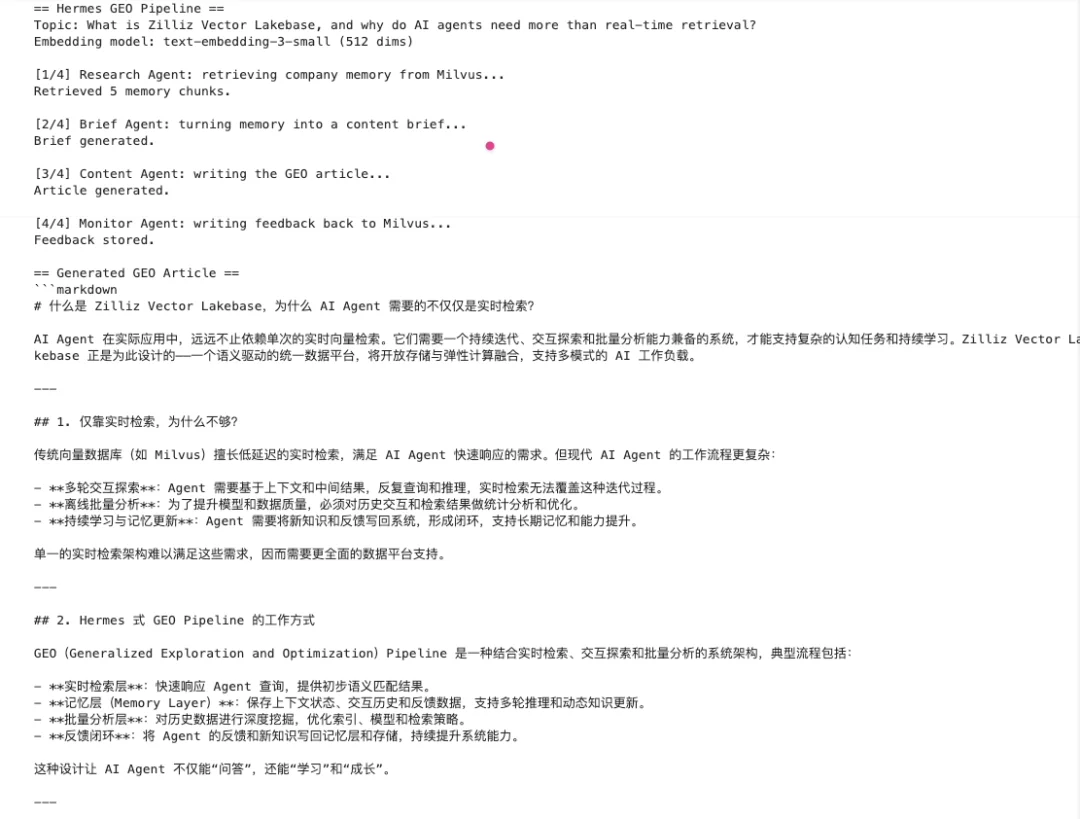
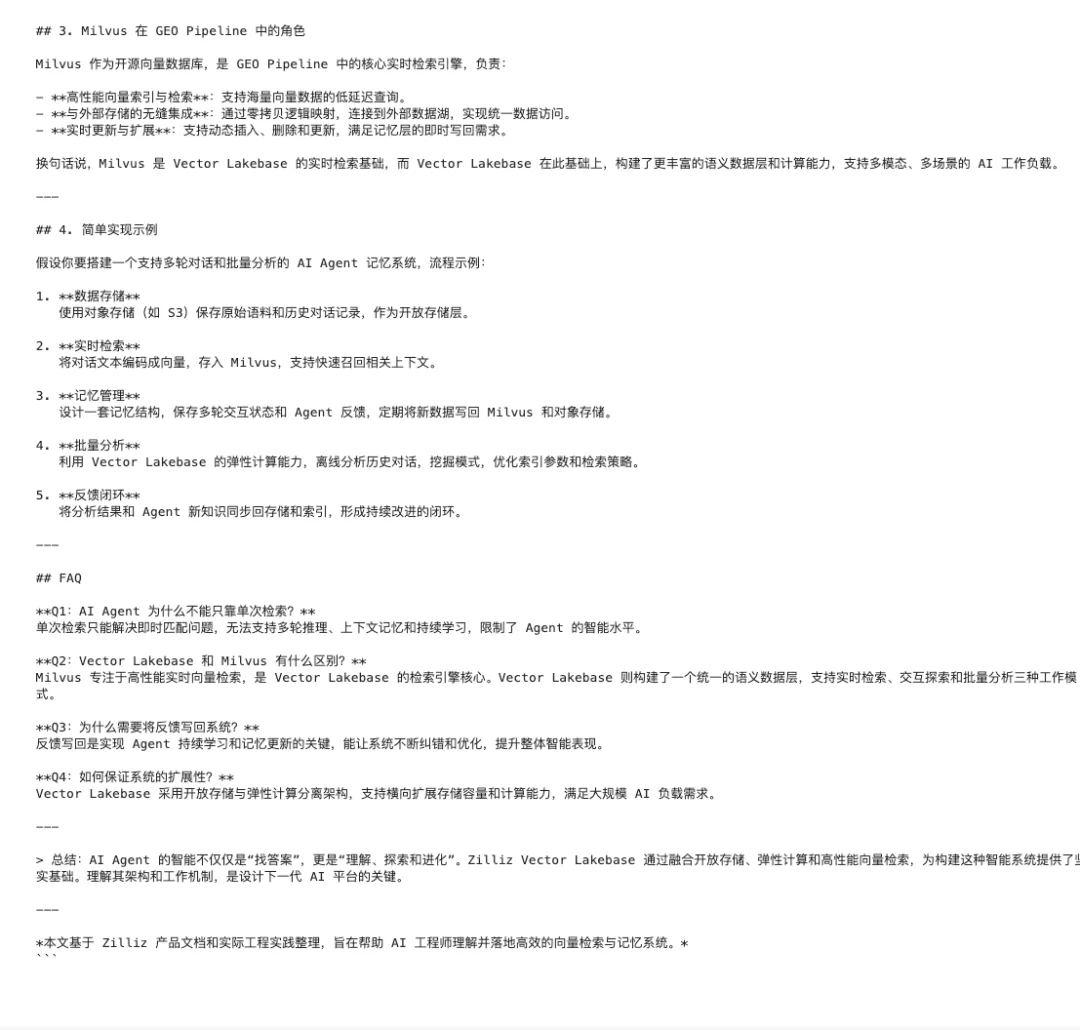
需要说明的是本文是一个最小版本的Hermes-style Pipeline,用来演示 Research、Brief、Content、Monitor 这些步骤如何串起来。如果希望它真正由 Hermes Agent 编排,需要先安装 Hermes CLI,并把GEO流程封装成Hermes可调用的skill、tool 或者脚本。

王舒虹
Zilliz Social Media Advocate
文章来自于"Zilliz",作者 "王舒虹"。


【开源免费】字节工作流产品扣子两大核心业务:Coze Studio(扣子开发平台)和 Coze Loop(扣子罗盘)全面开源,而且采用的是 Apache 2.0 许可证,支持商用!
项目地址:https://github.com/coze-dev/coze-studio
【开源免费】n8n是一个可以自定义工作流的AI项目,它提供了200个工作节点来帮助用户实现工作流的编排。
项目地址:https://github.com/n8n-io/n8n
在线使用:https://n8n.io/(付费)
【开源免费】DB-GPT是一个AI原生数据应用开发框架,它提供开发多模型管理(SMMF)、Text2SQL效果优化、RAG框架以及优化、Multi-Agents框架协作、AWEL(智能体工作流编排)等多种技术能力,让围绕数据库构建大模型应用更简单、更方便。
项目地址:https://github.com/eosphoros-ai/DB-GPT?tab=readme-ov-file
【开源免费】VectorVein是一个不需要任何编程基础,任何人都能用的AI工作流编辑工具。你可以将复杂的工作分解成多个步骤,并通过VectorVein固定并让AI依次完成。VectorVein是字节coze的平替产品。
项目地址:https://github.com/AndersonBY/vector-vein?tab=readme-ov-file
在线使用:https://vectorvein.ai/(付费)
【开源免费】AutoGPT是一个允许用户创建和运行智能体的(AI Agents)项目。用户创建的智能体能够自动执行各种任务,从而让AI有步骤的去解决实际问题。
项目地址:https://github.com/Significant-Gravitas/AutoGPT
【开源免费】MetaGPT是一个“软件开发公司”的智能体项目,只需要输入一句话的老板需求,MetaGPT即可输出用户故事 / 竞品分析 / 需求 / 数据结构 / APIs / 文件等软件开发的相关内容。MetaGPT内置了各种AI角色,包括产品经理 / 架构师 / 项目经理 / 工程师,MetaGPT提供了一个精心调配的软件公司研发全过程的SOP。
项目地址:https://github.com/geekan/MetaGPT/blob/main/docs/README_CN.md
【开源免费】FASTGPT是基于LLM的知识库开源项目,提供开箱即用的数据处理、模型调用等能力。整体功能和“Dify”“RAGFlow”项目类似。很多接入微信,飞书的AI项目都基于该项目二次开发。
项目地址:https://github.com/labring/FastGPT
【开源免费】graphrag是微软推出的RAG项目,与传统的通过 RAG 方法使用向量相似性作为搜索技术不同,GraphRAG是使用知识图谱在推理复杂信息时大幅提高问答性能。
项目地址:https://github.com/microsoft/graphrag
【开源免费】Dify是最早一批实现RAG,Agent,模型管理等一站式AI开发的工具平台,并且项目方一直持续维护。其中在任务编排方面相对领先对手,可以帮助研发实现像字节扣子那样的功能。
项目地址:https://github.com/langgenius/dify
【开源免费】RAGFlow是和Dify类似的开源项目,该项目在大文件解析方面做的更出色,拓展编排方面相对弱一些。
项目地址:https://github.com/infiniflow/ragflow/tree/main
【开源免费】phidata是一个可以实现将数据转化成向量存储,并通过AI实现RAG功能的项目
项目地址:https://github.com/phidatahq/phidata
【开源免费】TaskingAI 是一个提供RAG,Agent,大模型管理等AI项目开发的工具平台,比LangChain更强大的中间件AI平台工具。
项目地址:https://github.com/TaskingAI/TaskingAI
【开源免费】LangGPT 是一个通过结构化和模板化的方法,编写高质量的AI提示词的开源项目。它可以让任何非专业的用户轻松创建高水平的提示词,进而高质量的帮助用户通过AI解决问题。
项目地址:https://github.com/langgptai/LangGPT/blob/main/README_zh.md
在线使用:https://kimi.moonshot.cn/kimiplus/conpg00t7lagbbsfqkq0
